MagSafe 1 vs. 2 vs. 3: What Are the Key Differences?
Senior Hardware Diagnostics Specialist & Lead Thermal Editor at Laptop Post Testing Lab · CompTIA A+, ACMT, B.S. in Computer Engineering · 12+ years bench-testing laptop thermal solutions & motherboard repairs
If you are wondering what is the difference between MagSafe 1, 2, and 3 chargers, you are likely looking for a replacement for your Apple laptop. These magnetic charging cables have evolved significantly in size, shape, and compatibility over the last two decades.
Apple officially maintains these power adapter specifications to ensure your hardware receives the correct voltage. Using a mismatched adapter can prevent your device from charging or damage the internal port. As of 2026, understanding these specific connector variations is the best way to avoid a costly shopping error.
Quick Answer
MagSafe 1 uses a square connector for older laptops. MagSafe 2 features a flat, wide, and thin connector. MagSafe 3 utilizes a modern, rounded, and modular magnetic head.
They are not physically compatible without using specific adapters. You must match your charger to your MacBook year.
The Evolution of MagSafe: Why Apple Changed the Connector
Apple introduced MagSafe in 2006 to provide a safer way to charge portable computers. The core concept uses magnets to hold the plug in place rather than a tight mechanical friction fit. This allows the cable to snap away cleanly if someone trips over it.
The physical design of the connector changed twice to match the shrinking profile of MacBook hardware. Modern laptops require different power delivery standards than the models produced in 2006. Research from the Apple Support documentation confirms these distinct generations are engineered for specific logic board power requirements.
| Generation | Connector Shape | Primary Use Case |
|---|---|---|
| MagSafe 1 | Square / L-shape | 2006–2012 MacBooks |
| MagSafe 2 | Flat / Wide | 2012–2017 MacBooks |
| MagSafe 3 | Rounded / Modular | 2021–Present MacBooks |
Quick Reference: Identifying Your MacBook Port
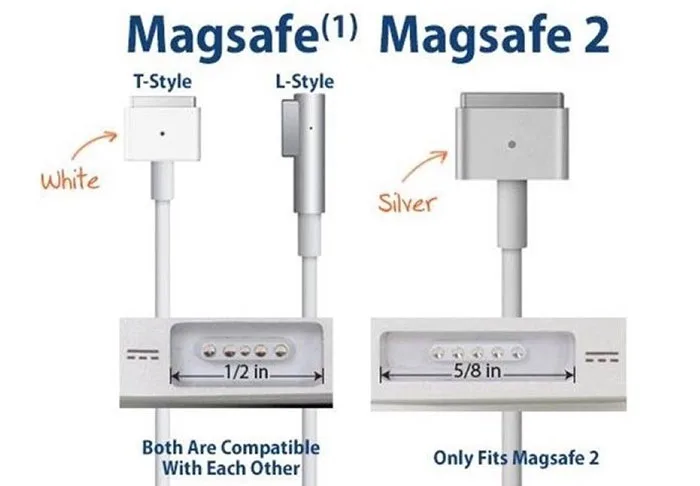
Identifying your port starts with the physical appearance of the charging slot on the side of your laptop. MagSafe 1 ports are deep, square holes. MagSafe 2 ports are thin, horizontal slits designed for thinner chassis.
MagSafe 3 ports look similar to MagSafe 2 but feel different when you connect them. The connection feels more secure, and the cable is often color-matched to your computer. If you have any doubt about the generation, check your model year in the About This Mac menu.
MagSafe 1: The Original Magnetic Standard
The original MagSafe system arrived with two primary connector shapes. Early models used an L-shape that hugged the laptop side to minimize snagging. Later versions switched to a T-shape that extended straight out from the port.
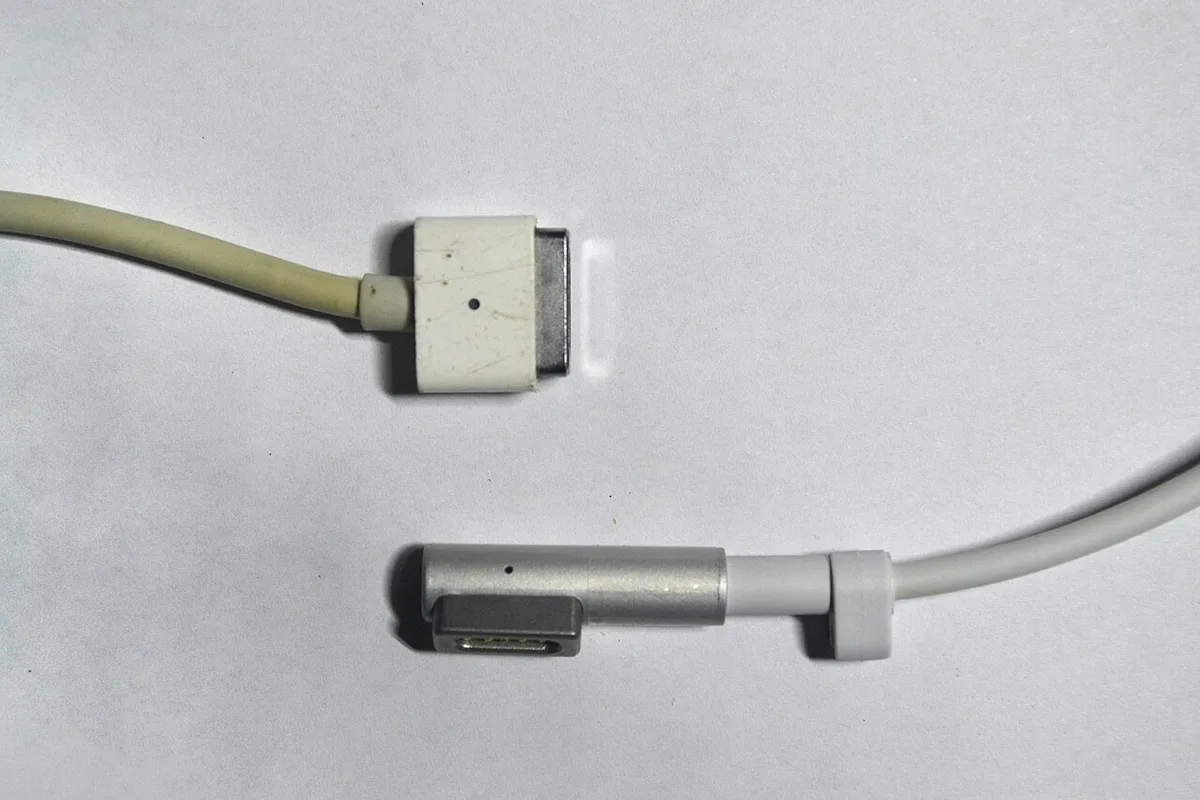
Both variants share the same electrical pins and internal wiring. These chargers are compatible with all MacBook models released between 2006 and early 2012. You will notice the rubber stress relief near the head often turns yellow or brittle after years of use.
MagSafe 2: The Slim Design for Retina MacBooks
Apple transitioned to the MagSafe 2 standard in 2012 to support the thinner, lighter Retina display models. This connector is noticeably wider and significantly flatter than the original square version. The magnets in this generation are stronger to compensate for the different angle of the port.
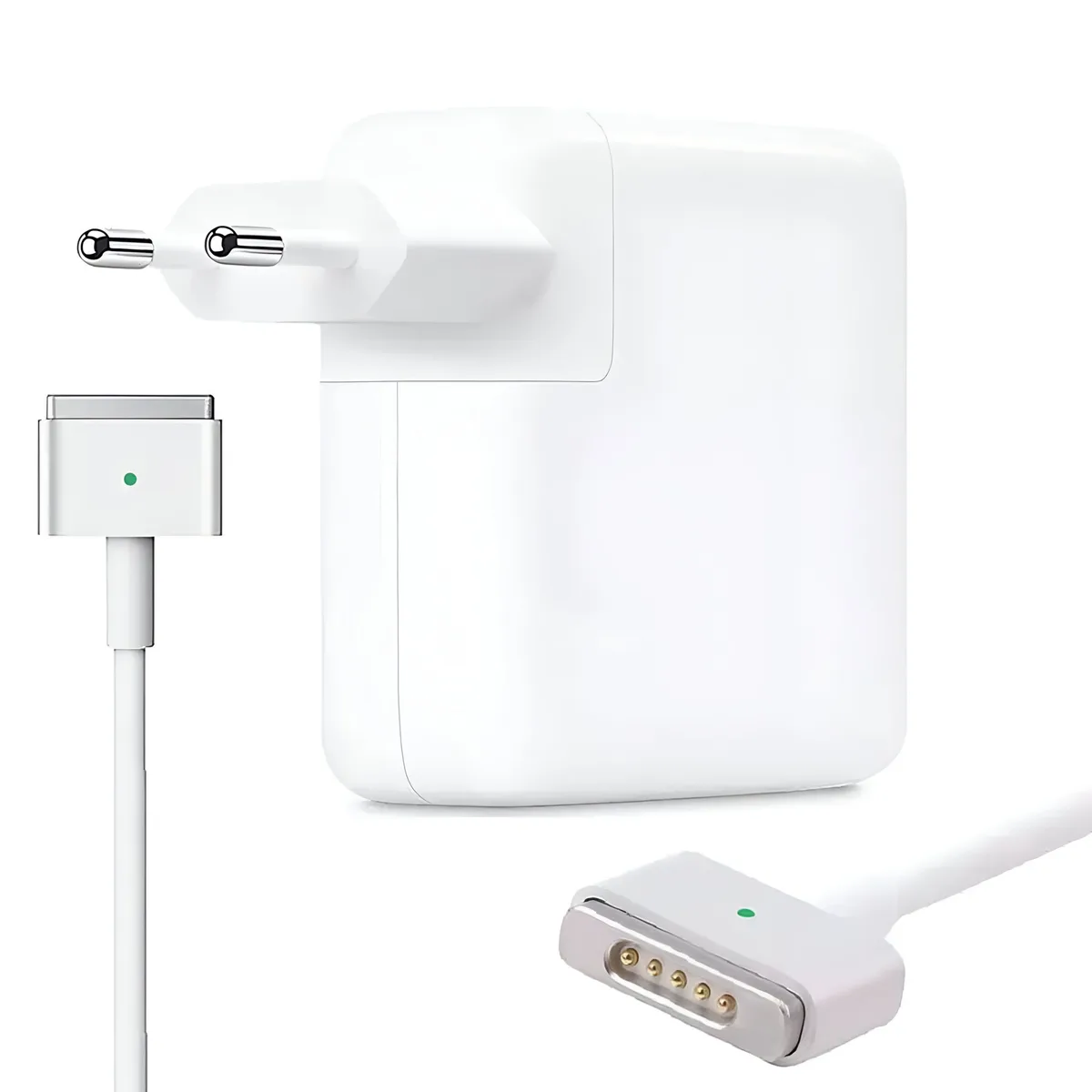
You cannot plug a MagSafe 1 cable into a MagSafe 2 port because the width is different. While an official adapter exists to bridge this gap, it is often bulky and prone to disconnecting. Most users find it more efficient to purchase a dedicated MagSafe 2 power brick for these older machines.
MagSafe 3: The Modular Return to Power
MagSafe 3 represents the current standard for high-end Apple Silicon hardware. It combines the convenience of magnetic snapping with the flexibility of a detachable cable. Unlike previous generations, the cable is separate from the power brick.
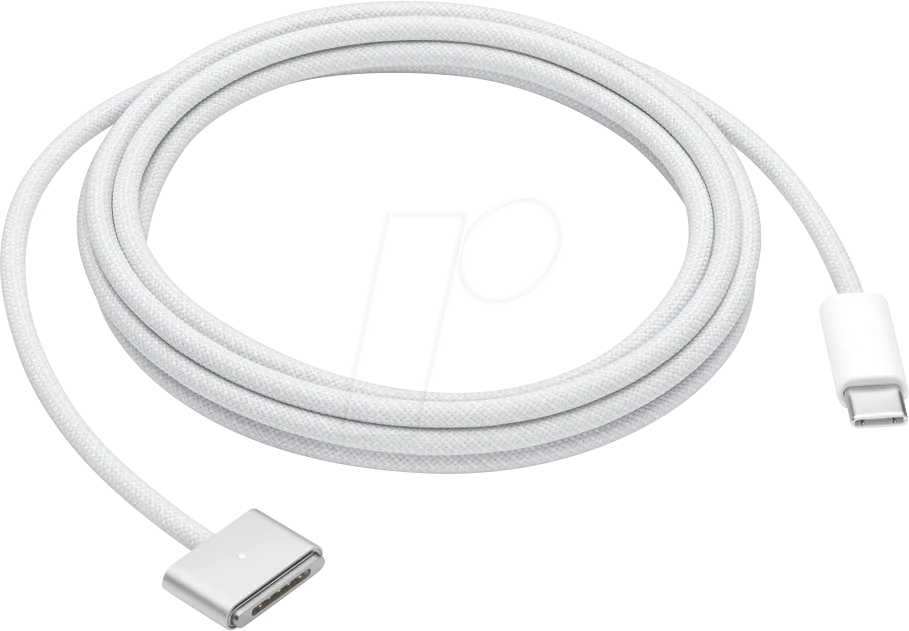
This modular approach allows you to replace a damaged cable without buying an entirely new power adapter. The connector head is rounded and requires much less force to seat correctly than older designs. It supports high-wattage charging for the most demanding MacBook Pro workloads as of 2026.
Comparison: Physical Differences and Intercompatibility
The primary difference lies in the width and depth of the connector head. MagSafe 1 remains the thickest, designed for the deeper ports of early MacBook models. MagSafe 2 is noticeably thinner and flatter, reflecting the shift toward ultra-portable laptop chassis.
MagSafe 3 is the most refined version. It is smaller than its predecessors and utilizes a different magnetic polarity. You cannot physically insert a newer charger into an older port.
The shapes simply do not align, and forcing a connection will likely break your laptop charging port pins.
How to Confirm Your MacBook Model and Charger Needs
You should never rely on memory when selecting a replacement charger. Start by clicking the Apple logo in your menu bar and selecting About This Mac. This menu provides the specific year and model name of your device.
Once you have this information, match it against the official Apple hardware compatibility database. Many users confuse MagSafe 2 with early USB-C models, leading to improper purchases. Always check for the specific wattage requirements listed on the base of your current power brick.
Common Mistakes When Replacing Your Power Adapter
The most common error is buying a cheap third-party charger that lacks proper safety circuitry. These units often fail to manage voltage fluctuations, which can degrade your battery health over time. Aggregate user reports indicate that non-certified adapters are also more prone to overheating.
Another mistake is ignoring the wattage rating. Your laptop needs a specific amount of power to function correctly. If you use a lower-wattage charger than your laptop requires, your machine will charge slowly or not at all.
Always choose a charger that matches or exceeds the minimum wattage for your specific model.
Why Cable Durability Differs Across Generations
Cable strain relief design evolved significantly between the three generations. MagSafe 1 and MagSafe 2 cables often suffered from frayed insulation at the connector head. This happened because the thick cables lacked the flexibility needed for constant movement in daily use.
MagSafe 3 fixes this by using a more durable, braided exterior material. Because the cable is now modular, you can replace it if it does tear. This design choice prevents you from throwing away a fully functional power brick when only the cable itself is damaged.
Benefits of Upgrading to MagSafe 3 Technology
The move to MagSafe 3 offers more than just a new connector shape. The primary benefit is the speed of power delivery. Modern MacBooks can pull more energy in less time, allowing for faster charging cycles compared to earlier models.
The modularity is also a significant long-term saving. You no longer need to pay for a new heavy power brick just because a cable failed. Simply purchasing a new USB-C to MagSafe 3 cable keeps your setup functional.
This system reduces e-waste and keeps your equipment running longer.
Safety and Voltage Considerations for Legacy Hardware
Using the wrong power adapter can pose a safety risk to your laptop battery and logic board. Apple specifies precise voltage and amperage requirements for every model, and straying from these standards may cause erratic charging behavior or system performance throttling.
Check the label on your power brick before plugging it in, regardless of whether the connector fits. An undersized charger may lead to excessive heat buildup within the adapter casing. If your adapter feels abnormally hot to the touch, disconnect it immediately and verify the wattage rating against your system specifications.
Maintenance Tips to Prevent Cable Fraying
You can significantly extend the life of your power cable by avoiding sharp bends near the connector head. Most fraying occurs when the cable is tightly wrapped around the brick or bent at a harsh ninety-degree angle during use.
Always allow for a loose loop when storing your cable. Avoid placing heavy items on top of the cord, as internal wires can easily break under pressure. Periodically inspect the rubber casing for hairline cracks or exposed shielding, as these are primary indicators of imminent failure.
Real Scenarios: Case Examples
Consider the common situation where a user tries to revive a 2011 MacBook Pro. Many people assume any Apple magnetic charger will work, but attempting to force a MagSafe 2 connector into a MagSafe 1 port will fail. It often leads to damaged pins on the laptop side, which is a costly repair.
Another scenario involves the 2012, 2015 Retina models that strictly require MagSafe 2. Users frequently try to use high-wattage MagSafe 3 bricks with older machines using cheap third-party converters. This setup often results in unstable power delivery or the laptop failing to recognize the charger entirely, highlighting the need for verified, generation-specific hardware.
Frequently Asked Questions
Can I use a MagSafe 2 charger on a MagSafe 3 laptop?
No, they are physically incompatible. MagSafe 3 uses a distinct shape and internal pin layout that does not connect to MagSafe 2 ports. You must use a dedicated MagSafe 3 cable to power your modern Apple Silicon device correctly.
Are all MagSafe 3 cables the same?
While the connector head is the same, the power adapters (bricks) vary in wattage. You should use a power adapter that meets or exceeds the wattage requirements of your specific MacBook model. Lower-wattage bricks will charge your laptop much slower than intended.
How do I know if my MagSafe cable is original?
Official cables have specific markings and high-quality finishes that counterfeit versions lack. Check the underside of your power brick for official Apple branding, model numbers, and safety certification logos. Third-party cables often feel lighter, have thinner wiring, and lack consistent magnetic strength.
Does a higher wattage charger damage my MacBook?
No, your MacBook will only draw the amount of power it needs. Using a 140W charger on a laptop that only requires 67W is perfectly safe. The charging system in your MacBook manages the power intake automatically to prevent overcharging or hardware damage.
Can I repair a frayed MagSafe cable?
Attempting to repair frayed internal wires is dangerous and strongly discouraged. Exposed wiring presents a shock and fire hazard, especially with power adapters handling high currents. It is always safer to replace the cable or the power brick entirely to maintain electrical safety.
Final Verdict: Choosing the Right Charger for Your Machine
Your selection depends entirely on your MacBook generation. MagSafe 1 is for early models, MagSafe 2 for the Retina era, and MagSafe 3 for the modern Apple Silicon lineup. Do not let physical similarity mislead you into choosing an incompatible generation.
Always check your specific model year, match the wattage, and stick to authentic hardware when possible. This approach protects your investment and ensures your machine charges reliably. When your charger matches your hardware, you gain the benefit of a stable, safe, and efficient power experience.

Similar Posts