What Is an E-Marker Chip in 100W & 240W USB-C Cables?
Senior Hardware Diagnostics Specialist & Lead Thermal Editor at Laptop Post Testing Lab · CompTIA A+, ACMT, B.S. in Computer Engineering · 12+ years bench-testing laptop thermal solutions & motherboard repairs
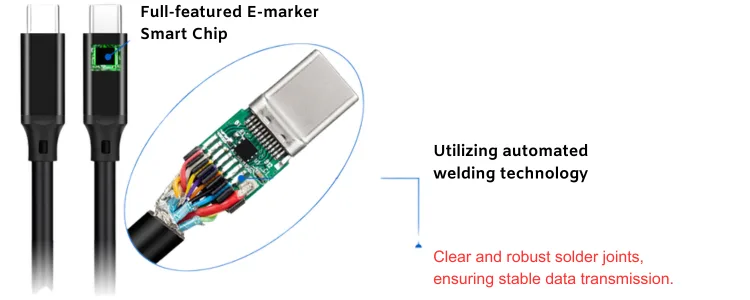
If you are asking what is an e-marker chip in 100w and 240w usb-c charging cables, the answer is simple. It is a tiny identity chip inside the cable plug. It tells the charger and device how much power the cable can safely carry.
Without the right data, high-power charging stays limited.
Under USB Power Delivery, a 100W cable usually supports 20V at 5A. A 240W Extended Power Range cable can support 48V at 5A. Those ratings only work when the e-marker reports the correct cable capability.
That is where the comparison starts.
Why the E-Marker Chip Matters in 100W and 240W USB-C Charging Cables
A USB-C cable is not just wires. At high power, the charger needs proof the cable can carry the current. The e-marker provides that proof.
It stops a charger from pushing 5A through a thin 3A cable.
As of 2026, many laptops, power banks, and chargers use USB Power Delivery for charging. Some also support USB PD 3.1 Extended Power Range. That makes cable identity more important, not less.
- A 60W or 3A cable can limit a 100W charger.
- A 100W cable can still lack 240W EPR support.
- A 240W cable only helps if the charger and device support EPR.
- A missing or faulty e-marker can cause slow charging.
The physical connectors look identical. That is the trap. A 3A cable and a 5A cable can use the same USB-C plugs.
The difference lives in the e-marker data and the conductor design.
That matters for troubleshooting. If a laptop charges slowly on a new charger, the cable may be the limit. The charger may be fine.
The device may be fine.
| Situation | Likely result |
|---|---|
| 100W charger with 3A cable | Charging may stay near 60W |
| 100W charger with 5A e-marker cable | The charger can offer 100W |
| 240W charger with non-EPR cable | Charging may stay at 100W or lower |
These fallbacks are safety features. They are not defects. They are the system using the lowest verified limit.
High current also creates heat. Thicker power conductors and better terminations help. The e-marker does not change that physics.
It only stops the system from ignoring it.
This is why the wattage printed on the jacket is not enough. You need the correct current rating, voltage rating, and cable capability data.
Quick Answer
What is an e-marker chip in 100w and 240w usb-c charging cables? It is a small identity chip. It lives inside a USB-C plug.
It stores safe current and voltage limits. Chargers read it before high-power charging. 100W needs 5A data. 240W also needs EPR support.
How USB PD Reads the E-Marker Chip Over the CC Line
USB PD communication happens on the Configuration Channel, or CC line. That is the small control path inside the USB-C connection. It is separate from the main power conductors.
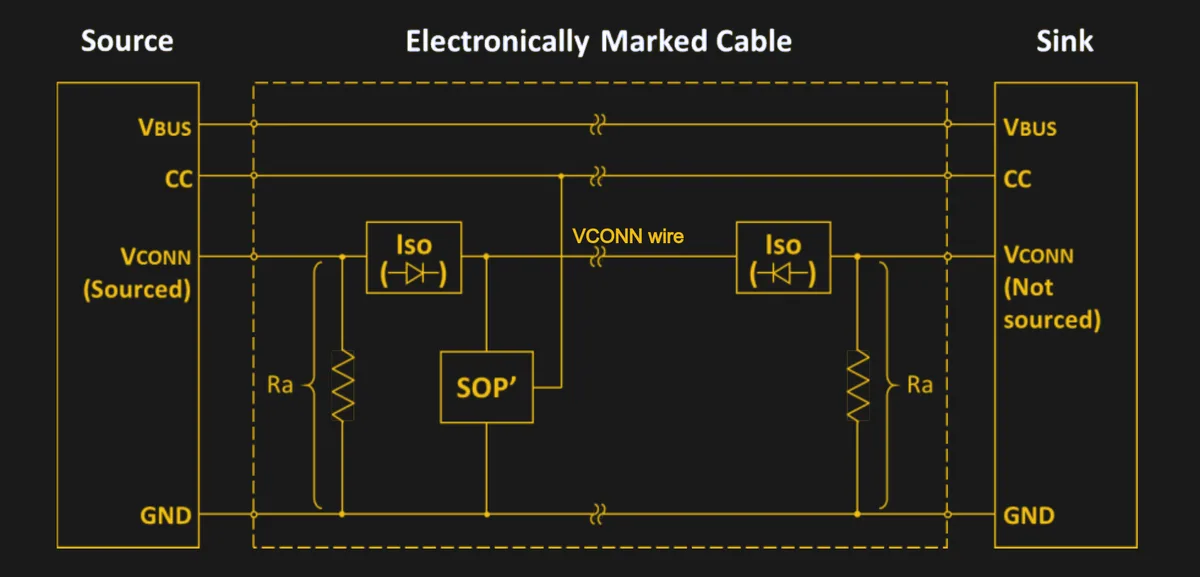
When you plug in the cable, the source can power VCONN on the CC line. The e-marker uses that power to respond. The charger then asks for Cable ID information using SOP Prime messages.
The e-marker sits inside the cable connector shell. It uses non-volatile memory, so the data stays present without a battery. The chip is small, but its role is formal.
It gives the cable a machine-readable identity.
- The charger detects a USB-C connection.
- It supplies VCONN to the cable electronics.
- It sends a Cable ID request.
- The e-marker returns capability data.
- The charger uses that limit during power negotiation.
SOP Prime messages are addressed to the cable, not the device. That distinction matters. The charger is talking to the cable itself.
It is asking what the cable can carry.
The returned data can include maximum current, maximum voltage, cable type, latency, and connector information. It may be stored as Cable Capability VDOs. These capability records tell the charger what the cable can safely do.
The USB Implementers Forum defines this behavior in the USB Type-C and USB Power Delivery specifications.
| Path | Role |
|---|---|
| VBUS | Carries the main charging power |
| CC line | Handles plug orientation, cable discovery, and power negotiation |
| VCONN | Powers cable electronics when present |
If the cable does not report 5A support, the system stays within the lower safe limit. If it does not report EPR support, the system stays in Standard Power Range, or SPR. That fallback is useful, but it can cap your charging speed.
A damaged plug can break high-power charging. The power conductors may still work. The CC path may not.
The charger then refuses to raise power.
Some cables also include active electronics. Those cables can need more careful signal handling. The e-marker still reports the same basic limits.
The charger still uses that data before raising power.
100W USB-C Cables: 20V, 5A, and the Required E-Marker Data
A 100W USB-C cable is built for the older high end of USB PD. That is 20V at 5A. The math is simple. 20V times 5A equals 100W.
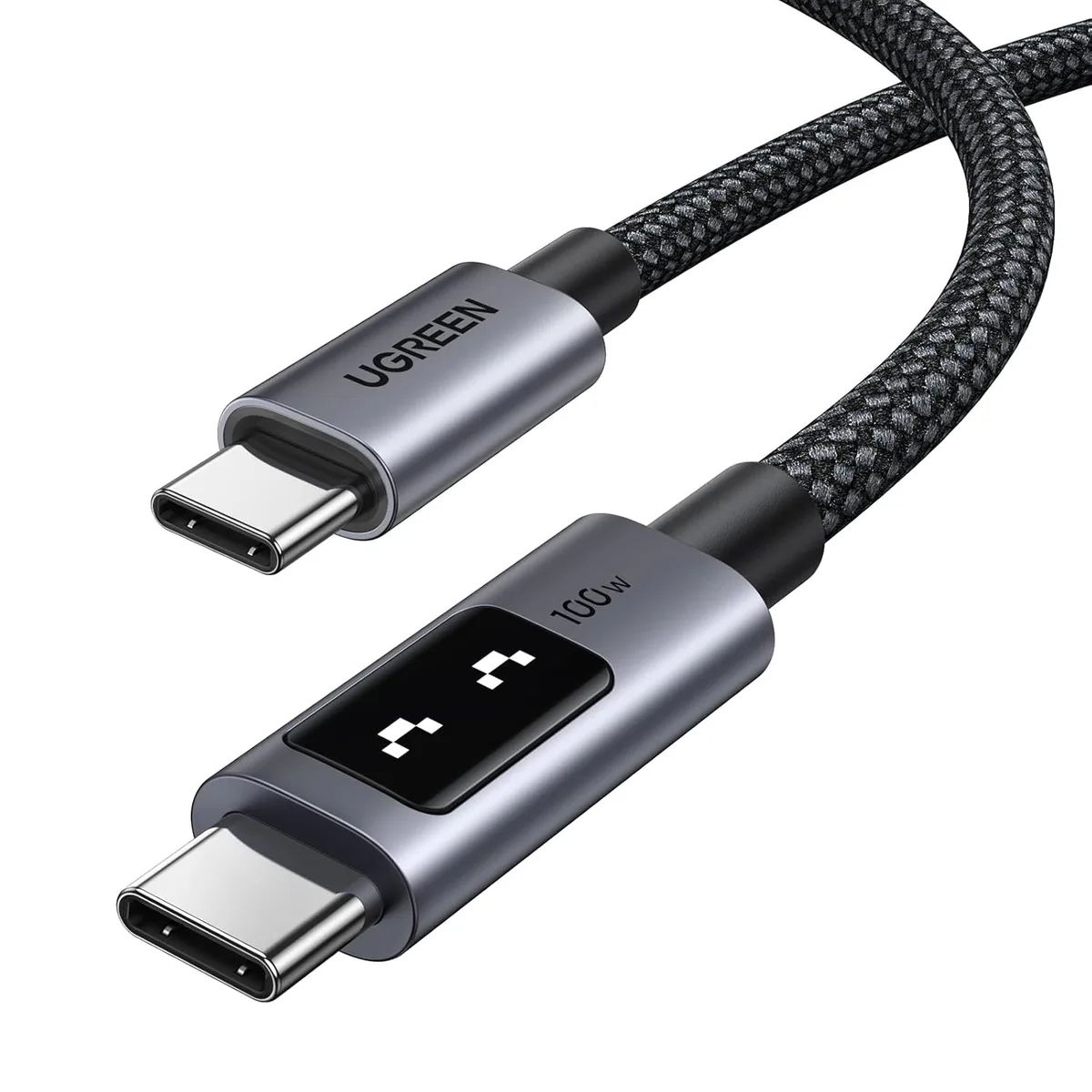
For that 5A step, the cable needs the right e-marker data. A basic 3A cable can handle 20V at 3A, or 60W. It cannot safely advertise 5A unless it is rated for that current.
| Cable rating | Practical USB PD limit | E-marker role |
|---|---|---|
| 3A cable | 60W at 20V | May not need full 5A cable identity |
| 5A cable | 100W at 20V | Must report 5A capability safely |
Manufacturer specifications for many 100W cables list a 5A current rating. Some also list USB 2.0 data only. That is normal.
A charging cable can be excellent for power and slow for data.
- Best for: most 65W to 100W USB-C laptop chargers.
- Best for: users who want a flexible high-power cable without EPR.
- Not enough for: 140W, 180W, or 240W EPR charging at full speed.
- Watch for: cheap cables that claim 100W without a clear 5A rating.
Does every 100W cable need an e-marker?
Yes, for true 100W USB PD operation. The 5A current rating requires cable capability data. A cable without that data should not be used for 20V at 5A.
Some cables are labeled 100W loosely, so check the current rating.
What should the e-marker report?
It should report the cable’s safe current, voltage, and type data.
- Maximum current: 5A
- Maximum SPR voltage: 20V
- Cable type: passive or active
- Connector type: USB-C to USB-C
- Vendor and product identity for traceability
Manufacturer specifications often list these values in the cable datasheet. Retail listings may not. That is why a clear 5A rating matters more than a big wattage claim.
The biggest confusion is wattage versus current. A charger may say 100W. The cable still must carry 5A.
If the e-marker does not confirm that, the charger may stay at 3A.
Here are three common cases.
- A 100W charger with a 3A cable may stay near 60W.
- A 100W charger with a proper 5A cable can reach 100W if the device accepts it.
- A phone on a 100W cable will usually take only the power it requests.
The cable does not force power into the device. The device requests power. The cable and charger negotiate the safe limit.
Cable length matters too. A longer cable has more resistance. More resistance can mean more heat and more voltage drop.
That is why a very long 100W cable needs robust conductors.
240W USB-C Cables: USB PD 3.1 EPR, 48V, and Extended Cable Capability
A 240W USB-C cable moves into USB PD 3.1 Extended Power Range. EPR raises the voltage options. The top profile is 48V at 5A.
That gives 240W.
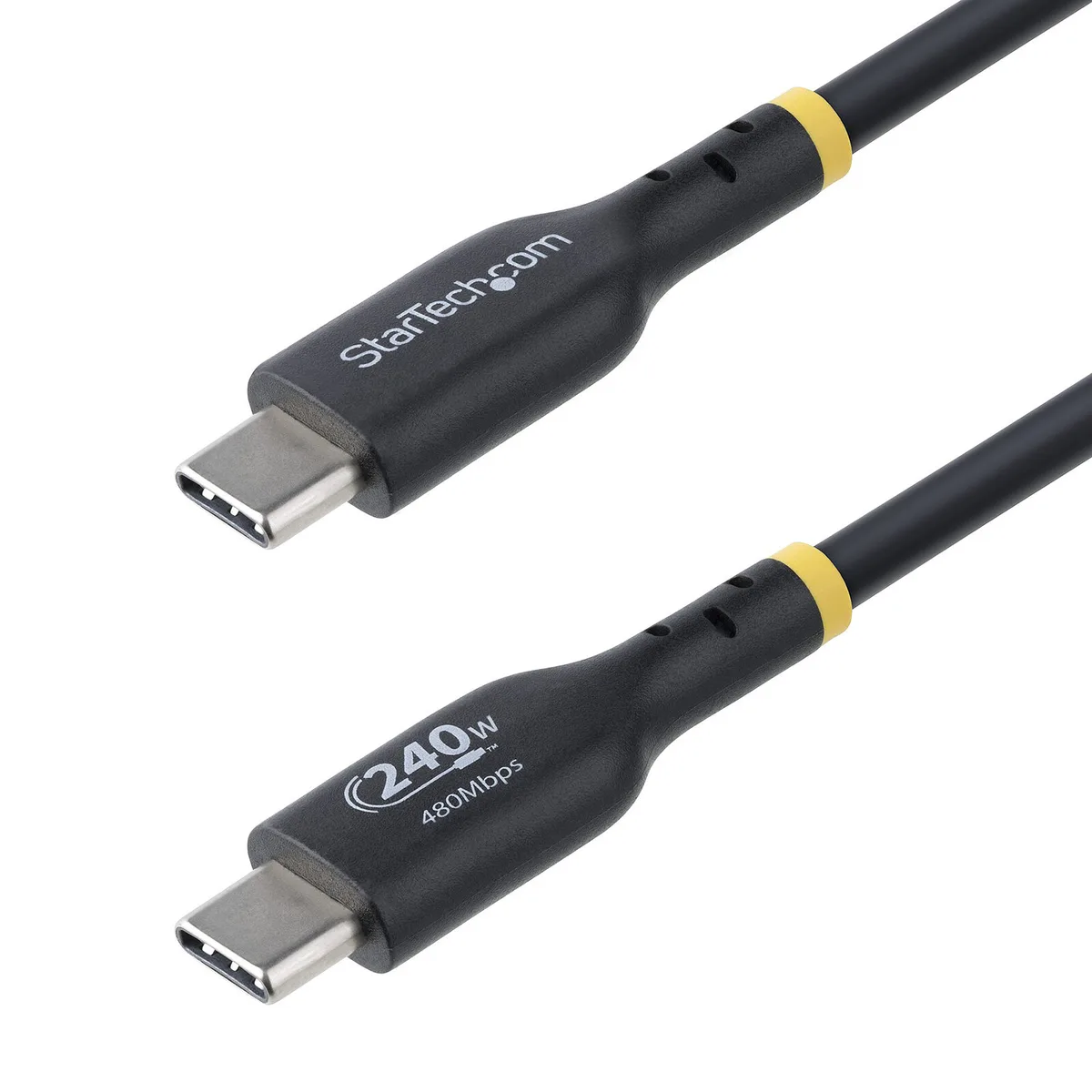
The e-marker still does the same core job. It tells the system what the cable can handle. For 240W, it must support the higher EPR voltage range and the correct cable capability data.
| USB PD mode | Top power level | Cable requirement |
|---|---|---|
| SPR | 100W | 20V and 5A support |
| EPR | 240W | 48V and 5A EPR support |
A 240W cable is not a magic upgrade. The charger must support EPR mode. The device must accept EPR.
The cable must be EPR-rated. If any part fails that check, charging falls back.
- Best for: EPR laptops, high-power workstations, and future-proof setups.
- Best for: 140W, 180W, or 240W USB PD charging when supported.
- Not needed for: phones and tablets that charge below 100W.
- Not needed for: most 65W travel chargers.
Is a 240W cable backward compatible?
Usually, yes. A 240W EPR cable can still work for lower USB PD charging. It will fall back to SPR when EPR is not available.
The main downside is often price, stiffness, or slower data support.
What changes at 48V?
Higher voltage raises the safety requirements. The cable insulation, connector design, and e-marker data all matter more. EPR also needs careful VBUS discharge behavior.
That is one reason credible certification matters.
| EPR profile | Power | Typical current |
|---|---|---|
| 28V | 140W | 5A |
| 36V | 180W | 5A |
| 48V | 240W | 5A |
Aggregate product listings show many 240W cables are still USB 2.0 for data. That is fine for charging. If you also need fast data or display use, check for USB4 or Thunderbolt support separately.
Many product listings show heavier conductors in 240W cables. That can make them less flexible. For a short desk cable, that tradeoff is easy.
For travel, it can be annoying.
A stiff cable is not a defect by itself. It often reflects the conductor size needed for high current. Still, check the bend radius if the cable will live in a tight bag.
If your laptop only charges at 100W, a 240W cable is safe but unnecessary. If your device supports 140W or 240W EPR, the right cable becomes useful. The e-marker is the gatekeeper.
For buyers, the practical rule is simple. Look for clear EPR labeling, USB-IF certification where available, and solid connector construction. A thin, no-name cable is not the place to chase a 240W rating.
100W vs 240W E-Marker Cables: Side-by-Side Comparison
The real difference is not just the wattage printed on the package. It is the voltage range, current rating, and EPR support stored in the cable identity. A 100W cable is built for the older 20V, 5A SPR profile.
A 240W cable is built for USB PD 3.1 EPR up to 48V, 5A.
Power, Voltage, Current, and Cable Capability
| Cable type | Top USB PD mode | Top profile | What the e-marker must support |
|---|---|---|---|
| 100W USB-C cable | SPR | 20V at 5A | 5A current and 20V SPR capability |
| 140W EPR cable | EPR | 28V at 5A | EPR mode and 28V capability |
| 180W EPR cable | EPR | 36V at 5A | EPR mode and 36V capability |
| 240W EPR cable | EPR | 48V at 5A | EPR mode and 48V capability |
A 240W cable usually covers the lower profiles too. That means it can charge a 65W laptop or a phone without issue. The reverse is not true.
A 100W SPR cable cannot safely become a 240W EPR cable.
Current stays at 5A across these high-power profiles. Voltage is what rises. That is why the cable insulation, connector design, and capability data become more important as EPR voltage increases.
Compatibility With Chargers, Laptops, and Power Banks
A cable does not create EPR support by itself. The charger must advertise EPR source capability. The device must request an EPR profile.
The cable must confirm the needed voltage and current.
If the charger supports 240W but the cable is only 100W, the system should stay at 100W or lower. If the device only supports SPR, a 240W cable will still work at lower power. The negotiation uses the safest shared limit.
- Choose 100W if your charger and laptop top out at 20V USB PD.
- Choose 240W if your laptop, power bank, or charger supports EPR profiles.
- Choose a full-featured cable if you also need USB data, display, or dock use.
- Avoid assuming a thick cable means high data speed. Many high-power cables are USB 2.0 only.
Which Cable Fits Your Device: Phones, Laptops, Power Banks, and EPR Chargers
The best cable depends on the highest power your device can actually request. A phone rarely needs 100W. A laptop may need it every day.
For phones and tablets, a 60W or 100W cable is usually plenty. Most phones charge far below 100W even when paired with a high-power charger. The device limits the draw.
A sturdy 3A or 5A cable can be a better value than a premium 240W cable.
For USB-C laptops, 100W is the practical baseline. Many 65W, 96W, and 100W chargers use 20V profiles. A proper 5A e-marker cable lets those chargers reach their rated output.
If your laptop came with a 100W USB-C charger, a quality 100W cable is usually the right match.
For EPR laptops and high-power workstations, 240W becomes useful. Some machines can charge at 140W, 180W, or 240W when the full chain supports EPR. In that case, a 240W EPR cable is not overkill.
It is the correct accessory.
Power banks follow the same rule. A 140W power bank needs an EPR cable to deliver 140W. A 100W power bank does not need a 240W cable.
If you use the power bank for phones only, a shorter 100W cable is often easier to carry.
| Device type | Best cable choice | Why |
|---|---|---|
| Phone or tablet | 60W or 100W USB-C cable | High EPR wattage is usually wasted |
| Standard USB-C laptop | 100W 5A cable | Matches most 20V PD chargers |
| EPR laptop or workstation | 240W EPR cable | Needed for 28V, 36V, or 48V profiles |
| High-output power bank | Cable matched to bank rating | Avoids paying for unused EPR support |
If you travel with one cable, a 100W cable is the safer all-around pick. It is usually lighter, cheaper, and more flexible. A 240W cable makes sense when your gear can actually use EPR.
Common Mistakes That Make a 100W or 240W Cable Charge Slowly
The most common mistake is matching a high-wattage charger to a low-current cable. A 100W charger cannot deliver 100W through a 3A cable. The system will stay near 60W at 20V.
That feels like a charger fault, but the cable is the limit.
Another mistake is assuming every USB-C cable is full-featured. Some cables handle power but lack proper data lanes. Others may support charging but not display output.
For charging alone, that may not matter. For docks and monitors, it does.
Buyers also confuse proprietary fast charging with USB PD. A cable may charge one phone quickly using a brand-specific protocol. That does not mean it supports 100W or 240W USB PD.
Check USB PD ratings separately.
- Using a USB-A to USB-C cable for high-power USB PD charging.
- Buying a cable labeled only by wattage without a current rating.
- Assuming a 240W cable forces faster charging on any device.
- Ignoring cable length when high current is involved.
- Replacing a damaged cable with a visually similar but lower-rated cable.
A damaged connector can also cause slow charging. The power pins may still make contact while the CC line fails. When that happens, the charger may refuse high current.
It may fall back to a low, safe charge rate.
Heat is another clue. A cable that becomes hot during charging is not behaving normally. High current creates some warmth, but excessive heat can mean poor contacts, undersized conductors, or a failing plug.
Stop using it.
If charging is slow, test the chain in order. Check the charger rating. Check the device power limit.
Then check the cable rating and condition. A USB PD tester or cable ID reader can show whether the cable is reporting the expected capability.
Safety, Certification, and Counterfeit E-Marker Risks
High-power USB-C charging is safe when the cable, charger, and device follow the specification. The risk rises when the cable lies about its capability. A counterfeit or poorly cloned e-marker can report incorrect current or voltage data.
That creates a real hazard. If a charger believes a thin cable can carry 5A, the cable may overheat. At EPR voltages, the stored energy is higher.
Faults can become more serious.
Look for USB-IF certification where available. Certified products have passed compliance testing. Certification does not make a cable perfect, but it reduces risk.
It also gives you a traceable vendor and product identity.
- Avoid cables with no brand, no rating, and no clear specifications.
- Avoid cables that get hot, smell warm, or cause charging drops.
- Avoid frayed insulation, bent plugs, or loose connectors.
- Avoid cables that only work when bent at a certain angle.
- Avoid unusually cheap cables claiming 240W EPR with no documentation.
Manufacturer specifications for reputable cables usually list current, voltage, and power ratings. They may also list temperature range and conductor details. If the listing is vague, treat the rating as unverified.
Charger quality matters too. A good USB PD charger should include overcurrent, overvoltage, and thermal protection. It should also handle VBUS discharge safely.
The cable cannot provide those protections alone.
For 240W EPR cables, buy from sellers with clear product documentation. EPR is newer and more complex than basic 60W charging. A credible brand is worth more than a marginal price saving.
How to Verify a Cable’s E-Marker Rating Before You Buy
You can verify a cable by checking its published rating, certification status, and physical quality. The first thing to confirm is the current rating. For 100W or 240W charging, you need a 5A cable.
Next, confirm the voltage mode. A 100W cable should support 20V SPR. A 240W cable should support USB PD 3.1 EPR up to 48V.
If the listing does not state that, do not assume it.
- Check the product page for 5A and EPR wording.
- Check for USB-IF certification or a compliance listing.
- Check whether the cable is passive or active.
- Check the data rating if you need files, docks, or video.
- Check connector quality and warranty terms.
A cable ID reader can provide deeper verification. These tools read the e-marker data over the CC line. They can show vendor ID, product ID, current rating, and voltage capability.
This is useful for IT teams, repair shops, and buyers of bulk cables.
If you already own the cable, watch the charging behavior. A proper 100W connection should negotiate 20V at up to 5A when the device requests it. A proper 240W EPR connection should enter EPR mode only when all three parts support it.
Do not rely on the plug color or cable thickness alone. Some high-quality cables are thick because of conductor size. Some cheap cables are thick because of filler or poor design.
The e-marker data and published specs are more useful.
For most readers, the buying rule is simple. Buy a 100W 5A cable for standard high-power USB PD. Buy a 240W EPR cable only when your charger and device support EPR.
Choose clear labeling over bold wattage claims.
Price and Spec Tradeoffs: 100W, 240W, USB4, and Thunderbolt Cables
Price usually rises with EPR rating, connector quality, and data capability. A basic 100W USB 2.0 charging cable often costs less than a 240W EPR cable. A USB4 or Thunderbolt cable can cost more again because it adds high-speed data and display support.
| Cable choice | Typical strength | Main tradeoff |
|---|---|---|
| 100W USB 2.0 | Affordable, flexible charging | Slow data |
| 240W EPR | Highest USB PD charging headroom | Often stiffer and pricier |
| USB4 or Thunderbolt | Fast data plus charging | Higher cost, power rating still needs checking |
Final Recommendation: When 100W Is Enough and When 240W Is Worth It
Choose a 100W 5A cable for most USB-C laptops, chargers, and power banks. It covers standard 20V USB PD and usually offers better value. Choose a 240W EPR cable only when your charger and device support 28V, 36V, or 48V profiles.
If your gear tops out at 100W, a 240W cable is safe but unnecessary.

Similar Posts